 FukaFuka Seika

In this third part, we will set up the driver code of the Entity Influence system and the Fade kernel, calculating non-grass-specific data required by the motion equation.
The C# side is split the same way as the GPU side: gameplay state (who the entities are, where the coverage window sits) lives in a manager; GPU resources and dispatches live in a URP renderer feature.
[!info] Overhaul 2026 This post is current being revised.
NOTE: All
usingdeclarations are hidden for clarity. You should be able to auto-complete them. Put the scripts under aPlantInteractionnamespace if you want them to match the sample project.
Entities
We start by defining the interface of our entities:
public interface IEntityInfluenceInfo{ public Vector3 WorldPos { get; } public float Radius { get; } public Vector3 WorldVel { get; } public float Height { get; }}C# doesn’t have multiple inheritance, thus using interface is the most flexible solution. The interface matches closely what we have defined in the compute shader InfluenceInfo. However, since we need to push the data into a buffer, and an interface is not blittable, we need a struct:
public struct EntityInfluenceInfo{ public const int Size = sizeof(float) * 8; public Vector3 worldPos; public float radius; public Vector3 worldVel; public float height; public EntityInfluenceInfo(IEntityInfluenceInfo info) { worldPos = info.WorldPos; worldVel = info.WorldVel; radius = info.Radius; height = info.Height; }}Size is the structured-buffer stride: 8 floats, 32 bytes, matching the HLSL packing from part 2 (float3 + float + float3 + float).
NOTE: The order of the fields in
EntityInfluenceInfomust matchInfluenceInfodeclared in HLSL. When transmitting data from CPU to GPU, there’s no way to remap fields as the data is essentially raw (void*). Furthermore, the computer does not give you any error message when you get the order wrong except when the ordering changed the size of the struct.
This would seem redundant, having both an interface and a struct, why not just having a struct and store it as a member field? The reason is we want our system to take care of data updating, instead of letting the containing class to call update per-frame (if we only retain EntityInfluenceInfo struct, the containing class will also need to set its values per-frame). This would make the API more friendly.
We will add a script called EntityInfluenceProvider that can be attached to any game object:
public class EntityInfluenceProvider : MonoBehaviour, IEntityInfluenceInfo{ public float radius = 1; public float height = 1; private Vector3? _lastPos; public Vector3 WorldPos => transform.position; public float Radius => radius; public Vector3 WorldVel { get; private set; } public float Height => height;
private void Update() { if (_lastPos.HasValue) { WorldVel = (WorldPos - _lastPos.Value) / Time.deltaTime; } _lastPos = WorldPos; }
private void OnEnable() { EntityInfluenceManager.Instance.AddEntity(this); }
private void OnDisable() { EntityInfluenceManager.Instance.RemoveEntity(this); }}Entity Influence Manager
Next, we will create a class that gathers all the info. For simplicity, we will make it a singleton.
public partial class EntityInfluenceManager{ [AutoStaticsCleanup] private static EntityInfluenceManager _instance; public static EntityInfluenceManager Instance { get { _instance ??= new(); return _instance; } }}[AutoStaticsCleanup] is a small helper that nulls the instance on domain reload introduced in the newer Unity 6 (saw it in 6.7a, could be earlier), so the editor does not keep a dead singleton.
We need a way to let other components to register entity influence info, as well as removal. Add these members to the class:
private List<IEntityInfluenceInfo> _entities = new();
public void AddEntity(IEntityInfluenceInfo entity){ if (_entities.Contains(entity)) return; _entities.Add(entity);}
public void RemoveEntity(IEntityInfluenceInfo entity){ _entities.Remove(entity);}For delta time, we record a timestamp and update Dt during system update. Fade will add this to every pixel’s elapsed time:
private float? _lastTimestamp;public float Dt { get; private set; }System Center
In Part 2 we talked about the texture should follow the protagonist. Therefore, we need a way to keep track of the center to produce center displacement and center position:
private EntityInfluenceCenter _center;public Vector2 CenterDisplacement { get; private set; } = Vector2.zero;private Vector2? _lastCenterPosition;
public Vector2 Center{ get { var pos = _center.Position; return new Vector2(pos.x, pos.z); }}
public bool HasCenter => _center is not null;
public void SetCenter(EntityInfluenceCenter center){ _center = center;}HasCenter is the pass’s “should I even run?” flag. Center is XZ only — the coverage window is a square on the ground plane. CenterDisplacement is this frame’s XZ delta in world units; later, the render pass converts it to pixels before uploading _CenterMotion.
The center is usually an entity as well, so we will subclass the EntityInfluenceProvider:
public class EntityInfluenceCenter : EntityInfluenceProvider{ private void Awake() { EntityInfluenceManager.Instance.SetCenter(this); }
private void OnDestroy() { EntityInfluenceManager.Instance.SetCenter(null); }
public Vector3 Position => transform.position;}System Update
Once per frame the pass hands us a staging buffer. We fill it from the registered providers and return how many slots are live. This is also where Dt and CenterDisplacement are computed, so the GPU sees a consistent snapshot:
internal int Update(NativeArray<EntityInfluenceInfo> stagingBuffer){ if (_center is null) return 0; if (_lastTimestamp.HasValue) { Dt = Time.time - _lastTimestamp.Value; } _lastTimestamp = Time.time; var currentCenter = Center; if (_lastCenterPosition.HasValue) { CenterDisplacement = currentCenter - _lastCenterPosition.Value; } _lastCenterPosition = currentCenter; var count = Mathf.Min(stagingBuffer.Length, _entities.Count); for (var i = 0; i < count; i++) { stagingBuffer[i] = new EntityInfluenceInfo(_entities[i]); } return count;}That is all of the non-graphics code. Notice there is no GraphicsBuffer here. The manager holds references (List<IEntityInfluenceInfo>) and produces a blittable snapshot; the pass owns the native copies:
| Copy | Where | What it stores |
|---|---|---|
List<IEntityInfluenceInfo> | manager, CPU | references to live providers |
NativeArray<EntityInfluenceInfo> | pass, CPU | packed values for this frame |
GraphicsBuffer | pass, GPU | the same packed values, bound as _InfluenceInfo |
Custom Renderer Feature
Assume you have seen Unity 6 URP’s Render Graph API at least once. If not, the mental model is: during recording you declare resources and a callback; later, during execution, that callback emits the actual CommandBuffer work. We add a compute pass by callingAddComputePass. Persistent textures (our history) are allocated outside of the render graph and imported. A deep dive of render graph is out of scope for this series, please refer to the official docs if you feel uncertain.
URP splits this into two types. We write the pass first, then a thin feature that owns it and exposes inspector fields:
ScriptableRenderPass— enqueued every camera, records into the graph, runs the compute shader.ScriptableRendererFeature— lives on the URP renderer asset, constructs the pass, enqueues it, disposes it.
In HDRP, RecordRenderGraph is roughly CustomPass.Execute, and the feature is the volume item that owns that pass.
Create a script EntityInfluencePass.cs. Both classes go in this file; start with the pass.
Pass Data
When writing a pass you generally will end up with a static render function wired up with SetRenderFunc. The reason it has to be static is to avoid any chance of closure allocation (“capture”), and that’s why you need the PassData to store anything you want to pass into such a static function.
public class EntityInfoRecordingPass : ScriptableRenderPass{ static readonly int InfluenceTexture = Shader.PropertyToID("_InfluenceTexture");
public struct PassDataConstants { public int textureSize; public float pixelToWorldRatio; public float worldToPixelRatio; }
public class PassData { public ComputeShader cs; public int fadeKernel; public int transcribeKernel; public TextureHandle back; public TextureHandle front; public BufferHandle buffer; public GraphicsBuffer rawBuffer; public NativeArray<EntityInfluenceInfo> stagingBuffer; public PassDataConstants constants; }}TextureHandle / BufferHandle are graph names for the imported resources. rawBuffer is the same GraphicsBuffer as buffer, kept as the native object because SetData is a C# API, not a command-buffer bind. fadeKernel is unused until the Fade section below; declaring it now keeps PassData stable.
Allocating Persistent GPU Resources
These allocations outlive a single frame. Add the fields, constructor, and allocator to EntityInfoRecordingPass. The constructor arguments (texSize, maxEntityCount, coverageSize) are the inspector exposed values the feature will pass in later.
private ComputeShader _cs;private RTHandle _back;private RTHandle _front;private GraphicsBuffer _buffer;private NativeArray<EntityInfluenceInfo> _stagingBuffer;private bool _isFrontTextureBack;private PassDataConstants _constants;
public EntityInfoRecordingPass(ComputeShader cs, int texSize, int maxEntityCount, float coverageSize){ _cs = cs; _constants.textureSize = texSize; _constants.pixelToWorldRatio = coverageSize / texSize; _constants.worldToPixelRatio = texSize / coverageSize; renderPassEvent = RenderPassEvent.BeforeRendering; EnsureResources(maxEntityCount);}
private void EnsureResources(int maxEntityCount){ _stagingBuffer = new NativeArray<EntityInfluenceInfo>(maxEntityCount, Allocator.Persistent); _buffer = new GraphicsBuffer(GraphicsBuffer.Target.Structured, maxEntityCount, EntityInfluenceInfo.Size);
var descriptor = new RenderTextureDescriptor( _constants.textureSize, _constants.textureSize, GraphicsFormat.R16G16B16A16_SFloat, 0);
descriptor.msaaSamples = 1; descriptor.enableRandomWrite = true; descriptor.useMipMap = false; descriptor.autoGenerateMips = false;
RenderingUtils.ReAllocateHandleIfNeeded( ref _front, descriptor, FilterMode.Point, TextureWrapMode.Clamp, name: "_InfluenceTextureFront");
RenderingUtils.ReAllocateHandleIfNeeded( ref _back, descriptor, FilterMode.Point, TextureWrapMode.Clamp, name: "_InfluenceTextureBack");}
public void Dispose(){ _front.Release(); _back.Release(); _buffer.Dispose(); _stagingBuffer.Dispose();}A few details:
_isFrontTextureBackcontrols which texture is considered front texture. This flag is flipped every frame.enableRandomWrite = trueis required forRWTexture2DUAVs.GraphicsFormat.R16G16B16A16_SFloatis thehalf4layout from part 2.TextureWrapMode.Clampplus an explicit out-of-bounds path in Fade (coming later) keeps the window edge from wrapping history from the opposite side of the map.Allocator.Persistenton the staging array: lives as long as the pass is alive.Disposeis called by the renderer feature to release all the resources.
Recording: Import, Ping-Pong, Set Render Function
Recording does not upload entity data and does not dispatch. It tells the graph which textures this pass will touch and which callback to run.
Notice how _isFrontTextureBack flips the front and back textures: this frame, _front is the UAV we write and _back is history; next frame the binding swaps. After the pass, the texture we wrote this frame is published as the global _InfluenceTexture so Shader Graph / vertex shaders can sample it.
public override void RecordRenderGraph(RenderGraph renderGraph, ContextContainer frameData){ if (!EntityInfluenceManager.Instance.HasCenter) return; using var builder = renderGraph.AddComputePass<PassData>( "Influence Texture Update", out var passData);
var front = renderGraph.ImportTexture(_front); var back = renderGraph.ImportTexture(_back); var buffer = renderGraph.ImportBuffer(_buffer); passData.cs = _cs; passData.transcribeKernel = _cs.FindKernel("Transcribe");
passData.back = _isFrontTextureBack ? front : back; passData.front = _isFrontTextureBack ? back : front; passData.buffer = buffer; passData.rawBuffer = _buffer; passData.constants = _constants; passData.stagingBuffer = _stagingBuffer;
builder.UseTexture(back); builder.UseTexture(front, AccessFlags.Write); builder.UseBuffer(buffer); builder.AllowPassCulling(false);
builder.SetGlobalTextureAfterPass(_isFrontTextureBack ? back : front, InfluenceTexture);
builder.SetRenderFunc<PassData>(Render);
_isFrontTextureBack = !_isFrontTextureBack;}NOTE: you can see there’s an obvious optimization: move the
FindKernelto the constructor as there’s no reason the kernel id would change.
The Render Function
Once again,Render is static to avoid closure allocations. You can perfectly write a non-static render function but if you have any memory allocation linting, you could see “capture of …”, which isn’t free. We also call the manager’s update function here to avoid any timing issues:
private static void Render(PassData data, ComputeGraphContext ctx){ var cnt = EntityInfluenceManager.Instance.Update(data.stagingBuffer); var centerDisplacement = EntityInfluenceManager.Instance.CenterDisplacement * data.constants.worldToPixelRatio; var center = EntityInfluenceManager.Instance.Center; var halfSize = data.constants.pixelToWorldRatio * data.constants.textureSize / 2; data.rawBuffer.SetData(data.stagingBuffer);
ctx.cmd.SetComputeVectorParam(data.cs, "_InfluenceTextureParams", new Vector4(data.constants.pixelToWorldRatio, data.constants.textureSize, center.x - halfSize, center.y - halfSize)); ctx.cmd.SetComputeVectorParam(data.cs, "_CenterMotion", new Vector4( EntityInfluenceManager.Instance.Dt, 0, centerDisplacement.x, centerDisplacement.y ));
var group = Mathf.CeilToInt(data.constants.textureSize / 8f);
ctx.cmd.SetComputeBufferParam(data.cs, data.transcribeKernel, "_InfluenceInfo", data.rawBuffer); ctx.cmd.SetComputeIntParam(data.cs, "_InfluenceInfoCount", cnt); ctx.cmd.SetComputeTextureParam(data.cs, data.transcribeKernel, "_InfluenceTextureFront", data.front); ctx.cmd.DispatchCompute(data.cs, data.transcribeKernel, group, group, 1);}A reminder of what the magic vectors mean:
_InfluenceTextureParams
| Component | Value | Used as |
|---|---|---|
| x | coverageSize / texSize | world units per pixel (PixelToWorldPos) |
| y | texSize | integer bounds check in Transcribe |
| zw | center.xz - halfSize | lower-left origin of the coverage square |
_CenterMotion
| Component | Value | Used as |
|---|---|---|
| x | Dt | elapsed-time increment in Fade |
| y | unused | — |
| zw | world XZ delta * texSize / coverageSize | history shift, in pixels |
Renderer Feature: Inspector and Lifetime
With all the hard work done we only need the renderer feature to finally wire up the pass in the render pipeline.
public class EntityInfoRecordingFeature : ScriptableRendererFeature{ [SerializeField] private ComputeShader computeShader; public int influenceTextureSize = 512; public int maxEntityCount = 256; public float coverageSize = 128; private EntityInfoRecordingPass _pass;
public override void Create() { if (computeShader == null) return; _pass = new EntityInfoRecordingPass(computeShader, influenceTextureSize, maxEntityCount, coverageSize); }
public override void AddRenderPasses(ScriptableRenderer renderer, ref RenderingData renderingData) { if (_pass != null) renderer.EnqueuePass(_pass); }
protected override void Dispose(bool disposing) { _pass.Dispose(); }}Add this renderer feature to the URP renderer asset, assign the compute shader, set other fields to appropriate values depending on your world size and precision requirements.
Debugging
Let’s setup a simple shader to visualize our influence texture:
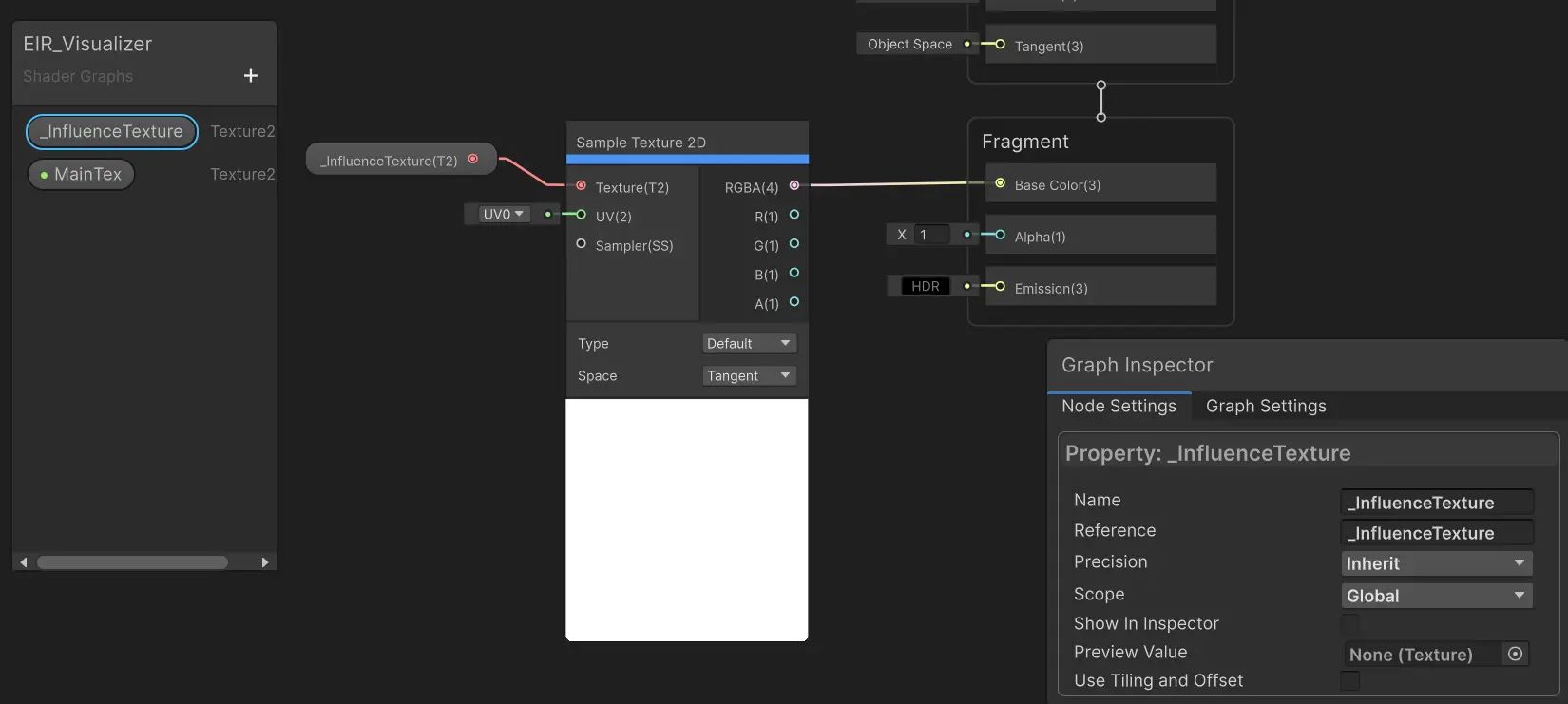
It samples the global texture _InfluenceTexture, and that’s it. Remember to set the scope of the influence texture parameter to Global or else it won’t work.
Create a material from this shader, add an UI Image and assign the image with the material created.
Now create an empty object and add an EntityInfluenceCenter and a EntityInfluenceProvider nearby. You should see something like this:
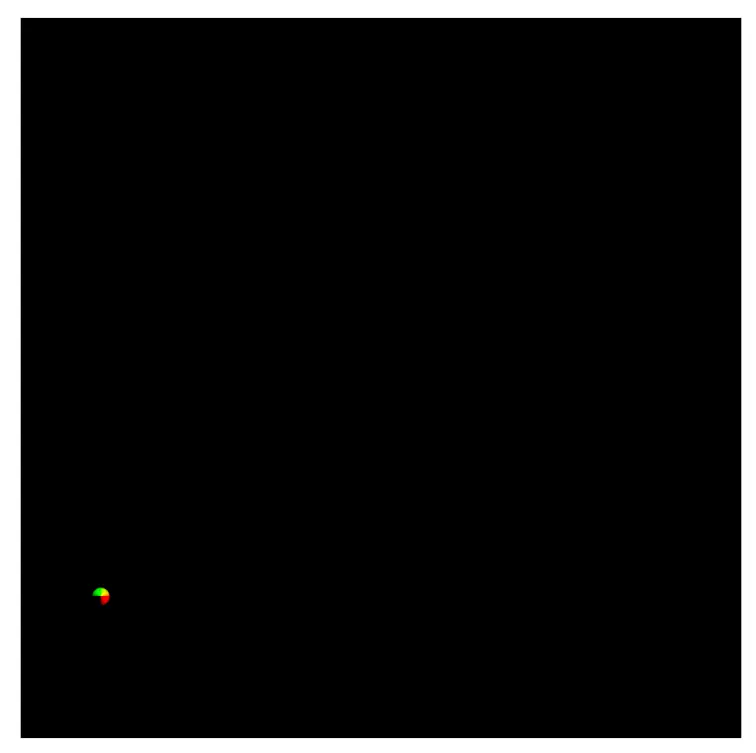
Drag around the objects to see the non-center object leaving behind a trail. The center object, however, should always stay static — it is glued to the middle of the coverage window.
At this point Fade is not running yet, so trails do not age. Transcribe writes A = 0 under entities and never touches the rest of the texture. Next we will finally implement the fade kernel.
The Fade Kernel
The fade logic is actually very easy, read elapsed time, and add Dt to it. The complexity comes from the moving center.
If the window origin moved by dx world units, a world point that used to live at pixel p now lives at p - dx / pixelSize. Equivalently, to fill current pixel p we read last frame at p + centerDisplacement (n.b. displacement is already in texel space).
If we ever find the history pixel is outside of the texture, we treat it as a neutral value (effectively when it converge to rest position). Here, 6000 seconds in alpha is far past any visible pendulum.
#define NEUTRAL_VALUE half4(0, 0, 0, 6000);
half4 SampleClamped(RWTexture2D<half4> tex, int2 px){ uint w, h; tex.GetDimensions(w, h); if (px.x < 0 || px.y < 0 || px.x >= w || px.y >= h) return NEUTRAL_VALUE; return tex[px];}
half4 SampleNearest(RWTexture2D<half4> tex, int2 current, float2 centerDisplacement){ return SampleClamped(tex, (int2)round(current + centerDisplacement));}And then the kernel:
#pragma kernel Fade[numthreads(8,8,1)]void Fade(uint3 id: SV_DispatchThreadID){ uint2 px = id.xy; uint width, height; _InfluenceTextureFront.GetDimensions(width, height); if (px.x >= width || px.y >= height) return; float2 centerDisplacement = _CenterMotion.zw; half4 lastFrameData = SampleNearest(_InfluenceTextureBack, px, centerDisplacement); half t = lastFrameData.w; t += _CenterMotion.x; _InfluenceTextureFront[px] = half4(lastFrameData.xyz, t);}Update the Dispatch Code
Recording already imported both textures. We only need the kernel index and, in Render, a bind + dispatch before Transcribe.
Replace RecordRenderGraph and Render with the versions below:
11 collapsed lines
public override void RecordRenderGraph(RenderGraph renderGraph, ContextContainer frameData){ if (!EntityInfluenceManager.Instance.HasCenter) return; using var builder = renderGraph.AddComputePass<PassData>( "Influence Texture Update", out var passData);
var front = renderGraph.ImportTexture(_front); var back = renderGraph.ImportTexture(_back); var buffer = renderGraph.ImportBuffer(_buffer); passData.cs = _cs; passData.transcribeKernel = _cs.FindKernel("Transcribe"); passData.fadeKernel = _cs.FindKernel("Fade");
18 collapsed lines
passData.back = _isFrontTextureBack ? front : back; passData.front = _isFrontTextureBack ? back : front; passData.buffer = buffer; passData.rawBuffer = _buffer; passData.constants = _constants; passData.stagingBuffer = _stagingBuffer;
builder.UseTexture(back); builder.UseTexture(front, AccessFlags.Write); builder.UseBuffer(buffer); builder.AllowPassCulling(false);
builder.SetGlobalTextureAfterPass(_isFrontTextureBack ? back : front, InfluenceTexture);
builder.SetRenderFunc<PassData>(Render);
_isFrontTextureBack = !_isFrontTextureBack;}private static void Render(PassData data, ComputeGraphContext ctx){5 collapsed lines
var cnt = EntityInfluenceManager.Instance.Update(data.stagingBuffer); var centerDisplacement = EntityInfluenceManager.Instance.CenterDisplacement * data.constants.worldToPixelRatio; var center = EntityInfluenceManager.Instance.Center; var halfSize = data.constants.pixelToWorldRatio * data.constants.textureSize / 2; data.rawBuffer.SetData(data.stagingBuffer);
ctx.cmd.SetComputeVectorParam(data.cs, "_InfluenceTextureParams", new Vector4(data.constants.pixelToWorldRatio, data.constants.textureSize, center.x - halfSize, center.y - halfSize)); ctx.cmd.SetComputeVectorParam(data.cs, "_CenterMotion", new Vector4( EntityInfluenceManager.Instance.Dt, 0, centerDisplacement.x, centerDisplacement.y )); ctx.cmd.SetComputeTextureParam(data.cs, data.fadeKernel, "_InfluenceTextureBack", data.back); ctx.cmd.SetComputeTextureParam(data.cs, data.fadeKernel, "_InfluenceTextureFront", data.front);
var group = Mathf.CeilToInt(data.constants.textureSize / 8f); ctx.cmd.DispatchCompute(data.cs, data.fadeKernel, group, group, 1);
4 collapsed lines
ctx.cmd.SetComputeBufferParam(data.cs, data.transcribeKernel, "_InfluenceInfo", data.rawBuffer); ctx.cmd.SetComputeIntParam(data.cs, "_InfluenceInfoCount", cnt); ctx.cmd.SetComputeTextureParam(data.cs, data.transcribeKernel, "_InfluenceTextureFront", data.front); ctx.cmd.DispatchCompute(data.cs, data.transcribeKernel, group, group, 1);}Update the visualizer:
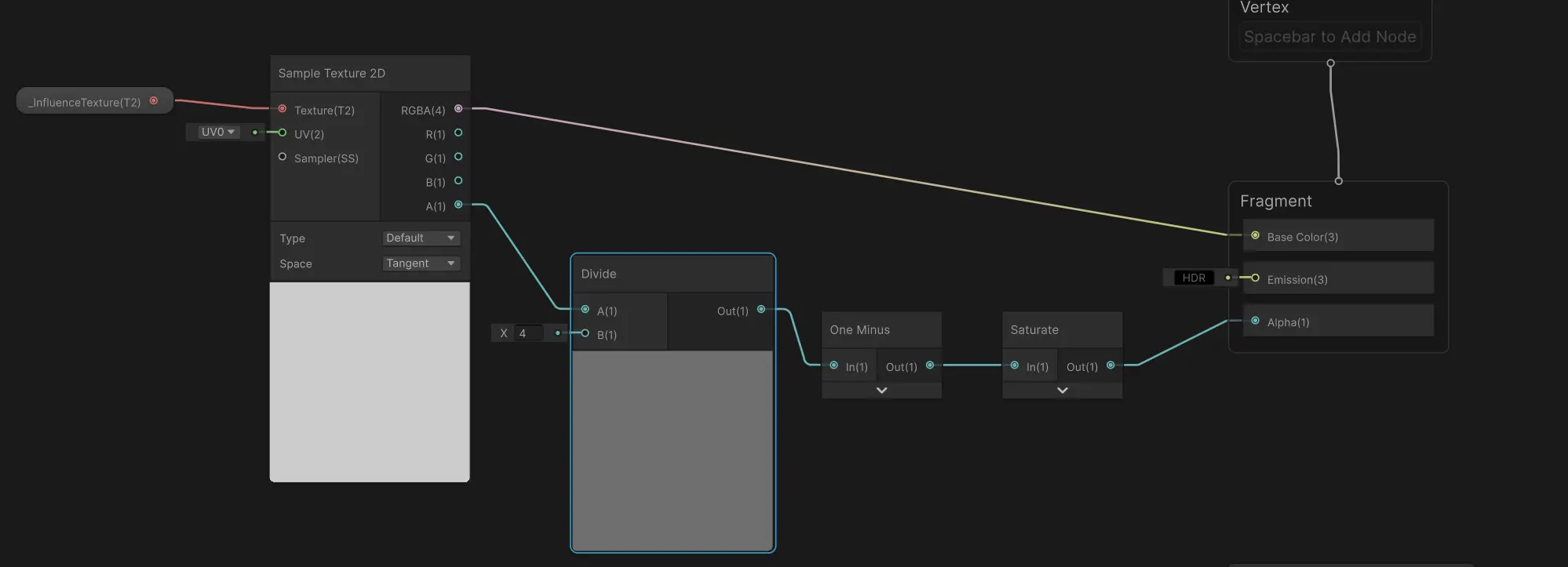
You can set the dividend to any value you like. A higher value allows you to see a longer duration.
Drag around, trails should now fade toward rest as you walk away, and stay glued to world space as the center moves.
But, if you move the center very slowly, you may notice something peculiar:
The other entity, which hasn’t moved, is leaving behind a trail!
This is due to the SampleNearest function we wrote. In that function, we used the round function. Imagine if the history texel is between two texels, one is with data and the other is a neutral value. If we are only slightly on the non-neutral side then round function tells us that we must pick the non-neutral value as history. This causes the value to “leak” to other texels and the error would accumulate. “Moving Slowly” makes this accumulation more evident. This class of error is referred to as Quantization Error.
Addressing the Quantization Error
The standard way to mitigate/reduce the quantization error is to use Bilinear Filtering (or any filtering you like). Here, instead of picking one pixel, we pick the neighboring 4 pixels, and weight the contribution using the fraction from the nearest sampling. Add the following function and replace SampleNearest with SampleBilinearFractionWeighted:
half4 SampleBilinearFractionWeighted(RWTexture2D<half4> tex, int2 current, float2 centerDisplacement){ float2 p = float2(current) + centerDisplacement; int2 base = int2(floor(p)); float2 f = frac(p); half4 s00 = SampleClamped(tex, base); half4 s10 = SampleClamped(tex, base + int2(1, 0)); half4 s01 = SampleClamped(tex, base + int2(0, 1)); half4 s11 = SampleClamped(tex, base + int2(1, 1)); float w00 = (1.0 - f.x) * (1.0 - f.y); float w10 = f.x * (1.0 - f.y); float w01 = (1.0 - f.x) * f.y; float w11 = f.x * f.y; return half4(s00 * w00 + s10 * w10 + s01 * w01 + s11 * w11);}Now redo the same experiment, the error may still be visible, but no way as prominent as previously seen, and should be largely invisible in actual runtime. Also, you can see the trail of the center has improved as well, it was suffering from the same quantization error and failed to produce visible trails.
This concludes our preparation work, and in the final part we will implement the vertex shader.