In the second part, we are going to set up the part of the compute shader for the Entity Influence system. In Entity Influence system, we will pre-compute some of the required parameters so that the vertex shader can later read them and use the appropriate motion equation to calculate the angle.
Since we might have different grass that react differently based on grass-specific parameters, the design philosophy is to separate entity influence and grass - we do not want to see any grass-specific constants in the entity influence system.
[!info] Overhaul 2026
Since Unity will start to unify render pipelines, I changed the HDRP tech stack in the original series to URP, and replaced more of the detailed implementation to implementation-agnostic explanations. It should be rather straightforward to port the implementation to HDRP. A significant optimization which was planned as part 5 of the series is now brought forward.
NOTE: This part expects you to know how Compute Shaders work, and some knowledge of the render pipeline you are working with. You should at least know how to create a CustomPass or ScriptableRenderPass in your render pipeline. We will work in URP and use ScriptableRenderPass here. I will try my best to abstract away the render pipeline specific features (which also future-proofs API changes). Feel free to make necessary adjustments according to the API you are given.
Our goal is to calculate a vertex displacement vector, that leads to the following questions:
To which direction should the grass blade bend?
What is the angle between the bent grass blade and the position at rest?
Is the grass blade actually being pressed by the instigator? (e.g. if the instigator jumped, then it should not be able to press any grass)
Since we are doing lots of spatial calculations, using a texture to store information is a natural fit. We will be converting the vertex position to a point on the texture, at which we will find these information.
To solve the third point, we can verify the vertical distance between the contact point of the entity with the grass root. If the distance is larger than the height of the grass, or is negative, then the grass is not pressed by the instigator. Therefore a single elevation value should be enough.
We have modeled instigators as capsules having elliptic caps. When viewed top-down, it is a circle. Without adding too much complexity, the direction of the grass blade should be from the center of the circle pointing outwards to where the grass blade is at.
This requires us to know for each vertex, where the center of the instigator is at. We could just store the center, but that means extra operation for each vertex. Thus we store the planar vector directly.
We actually have two different problems with angle: the initial angle when the grass blade is leaning on the instigator, and when the instigator left and the grass is in pendulum motion.
Recall in Part 1:
θ0(d)=2π−arctan(R02−d22h0d)
For initial angle calculation, we need the height h0 and radius R0 of the instigator, which are simply 2 tweakable floats.
As for d, by definition, is the top-down view distance between the center of the instigator (therefore, instigator’s transform position’s xz components), and the root of the grass. We can treat all grass that fall within the same pixel as having the same root position, then the grass root position is simply converting pixel coordinates to its equivalent world position. As you can see, the resolution of the texture decides how many grass patches are moving in the same way. You could eventually do interpolation using the fraction, but for simplicity we leave it out in this series.
The motion equation we established in the first part gives the angle. We will be implementing the most interesting underdamped case in this series, but feel free to implement other cases.
For each vertex:
θ(t)=θ0∗e−γtcos(ωt)
Where:
γ=2∗l0b
ω0=l0g−k
ω=abs(γ2−ω02)
We need grass length l0, elasticity constant k, damping coefficient b, and elapsed time t. The length, elasticity constant, and damping coefficient are all grass-specific constants that can be exposed as material properties, that leaves us with elapsed time which is a runtime variable. The definition of elapsed time, in our case, is the time when grass leaves the influence of an entity. We have 2 methods:
Store the timestamp t when the grass is last in an entity’s influence, then in the vertex shader, we can calculate the elapsed time with _Time.y - t.
Store the elapsed time dt directly. Each frame we increase the elapsed time dt by unity_DeltaTime.x, and set dt = 0 if the grass is in any entity’s influence.
They are both valid, but method 1 comes with a problem: your data type must be large enough to store the timestamp. Consider if using half, then your maximum timestamp is 65504, around 18 hours (which is ok if the player isn’t a marathon streamer), and the precision will get significantly worse when moving toward the limit. So we will adopt method 2 as a large elapsed time would make no visual difference compared to the rest position, and we could clamp it to avoid the overflow issue.
From the previous section we know we would need 2 operations:
A Fade pass that increases the elapsed time for all pixels.
A Transcribe pass that plots the direction and angle onto the texture and resets the elapsed time.
That’s 2 compute shader kernels.
[!question] Wait, can it be the same kernel?
For now, yes. It is totally possible to update the time and then immediately do a transcribe within the same dispatch. You may even argue that this would save a dispatch call and the related binding calls. We split the kernels for better illustrating the process, you are encouraged to merge them and do necessary benchmarking. (Spoiler: keeping them split is also the better theoretical choice once Fade becomes a full-screen history resample — more on that in part 3.)
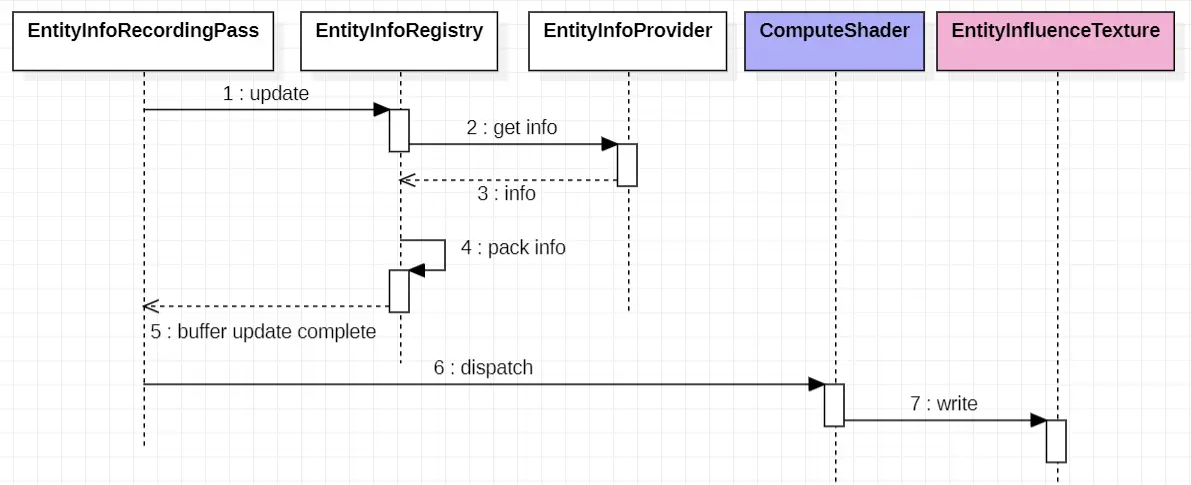
We also need a driver system that collects and uploads the entity influences to the GPU.
Each entity game object will have an EntityInfoProvider attached to them. The script will inform EntityInfoManager about the current position, radius, height, etc. of the entity.
Each frame, EntityInfoManager packs these info into a GraphicsBuffer. The pass will bind this buffer to a compute shader as well as other globally tweakable parameters, and dispatch the compute shader. The compute shader will calculate the influence of each entity, and write the results to Entity Influence Texture(s), which will later be used in vertex shaders.
Before we officially dive into implementation, we need to decide how to structure the data on the texture and what format should we use. Recall that we need a texture to store:
Elapsed time (float)
Direction (Vector2)
Initial angle (float)
Entity elevation (float)
“Blast! That’s 5 floats in total! That means we need 2 textures to fit them all in!” But here’s a trick we can do… see, when we need the direction, we do not need the magnitude of the Vector2. Later in the vertex shader, we would still call normalize on it. That means the magnitude of the vector can store another float… let it be the initial angle then!
NOTE: The choice of storing initial angle in magnitude is actually deliberate. The bottom surface elevation can be negative, so we can’t store it in magnitude. Elapsed time is positive, but if we store it in the magnitude, whenever we update influence, since time is reset to 0, it will set the direction to 0 as well. The initial angle does not have this side effect. Therefore, the value that is the most suitable for storing in magnitude is the initial angle.
We will be using a texture of format R16G16B16A16_SFloat which means 16-bit (half) per channel. Our calculation doesn’t need to be very precise so half is enough.
The layout of a pixel looks like this:
R: direction vector x component
G: direction vector y component
B: the elevation of the bottom surface of the object
A: elapsed time
Also, don’t forget that the magnitude of the direction vector is the initial angle!
Since we will be doing some conversion between pixels and world space, we need to know how much space does the texture cover, its world space offset, as well as the texture’s size. We will pack all these info into a float4:
x: world units per pixel (coverageSize / textureSize)
y: texture size in pixels (square)
zw: world-space origin of the coverage square — the lower-left corner, not the player/camera center
That origin is center.xz - coverageSize / 2. Pixel (0, 0) maps to that corner; the center of the texture maps to the tracked entity.
With format settled, how large should be the texture?
A simplistic approach would be to use a texture that is the same size as your world, and one pixel on the texture always represent the same square of your terrain. This makes the code very easy to write, but it comes with limitations. Suppose your world is 4096 units, then, you may use a 4096 texture - and that gives you a huge texture of about 134 MB and a barely enough precision of 1 pixel per unit. The texture will toll your GPU bandwidth for certain.
A more thought-out approach, which is the approach we will implement in this guide, is to use 2 textures centered around the camera or player character. For instance, using a 512 texture covering a 128 unit square around the player, will produce 4px per unit and only costs about 4 MB in total - that’s 4 times the precision and 3% the memory cost!
But why 2 textures? Because when we fade the influence over time, the player might have moved, and thus we need to fetch the content from a history pixel to the current pixel. If we only have one texture, then, the result can be unpredictable:
Thread 1 reads pixel A and writes to pixel B
Thread 2 reads pixel B and writes to pixel C
But which operation happens first? pixel C can have the content of pixel A if Thread 1 runs first, or it can have the content of pixel B if Thread 2 runs first. There’s just no guarantee. You could introduce atomics but that has performance implications. With 2 textures, all read happen on the “back” texture while all write happen on the “front” texture, so we do not have such issue.
The buffer containing entity influence info will have 2 float3 and 2 float. We pack them into a InfluenceInfo struct and use a StructuredBuffer to communicate between CPU and GPU. The _InfluenceInfoCount tracks the effective length of the buffer, and is equal to the number of entities registered. We will be allocating a large enough buffer for _InfluenceInfo (e.g. 256 elements), and use the count to delimit valid data range.
EntityInfluence.compute
1
struct InfluenceInfo
2
{
3
float3 worldPosition;
4
float radius;
5
float3 worldVelocity;
6
float height;
7
};
8
9
// raw influence info data
10
StructuredBuffer<InfluenceInfo> _InfluenceInfo;
11
12
// valid length of influence info
13
int _InfluenceInfoCount;
NOTE: The order of the fields in InfluenceInfo is important due to alignment requirements. In GPU shaders, buffers must adhere to specific alignment rules, which means types like float3 may get padded to ensure they fit properly in memory. If you don’t account for this, you may end up allocating more memory than necessary.
The struct above, with consecutive float3 and float packed into one 16-byte block, is equivalent to 32 bytes in total. However, if you order your struct like this:
1
struct InfluenceInfo
2
{
3
float3 worldPosition;
4
float3 worldVelocity;
5
float radius;
6
float height;
7
};
It will take up 48 bytes (3 float4), because the first float3 cannot be packed with the second float3 due to alignment rules, and as a result, it gets its own 16-byte block, with 4 bytes unused:
The first float3 occupies 16 bytes, but the remaining 4 bytes are unused (due to padding).
The second float3 and float fields fit into the second 16-byte block without wasting any space.
The final float gets its own 16-byte block, with 12 bytes wasted.
As a general rule, it’s good practice to ensure that fields in your struct are ordered in such a way that they can fit neatly into 16-byte blocks without any fields “sitting between two blocks.” This will help minimize wasted memory and ensure more efficient data storage.
The C# mirror of this struct must use the same field order and a stride of 32 bytes. There is no field remapping when you upload a structured buffer.
Now declare the two ping-pong textures and the packed constants that convert between world space and texture space. Write this below _InfluenceInfoCount:
EntityInfluence.compute
1
/**
2
* Texture to transcribe influence info to.
3
* Data layout of the influence texture
4
*
5
* R: N.x \ initial angle
6
* G: N.y /
7
* B: bottom surface elevation
8
* A: elapsed time since release
9
*/
10
RWTexture2D<half4> _InfluenceTextureBack;
11
RWTexture2D<half4> _InfluenceTextureFront;
12
13
/**
14
* x: 1 px = x units in world space (coverage / texture size)
15
* y: texture px size (square texture)
16
* zw: world-space origin (lower-left corner of the coverage square)
17
*/
18
float4 _InfluenceTextureParams;
19
20
/**
21
* x: dt
22
* y: unused
23
* zw: center displacement xz (in texture space, i.e. pixels)
24
*/
25
float4 _CenterMotion;
_CenterMotion and the back texture is unused until the Fade kernel in part 3. We still declare it now so the CPU-side packing can stay stable.
Now we need to take care of the pixels that fall into an entity’s influence.
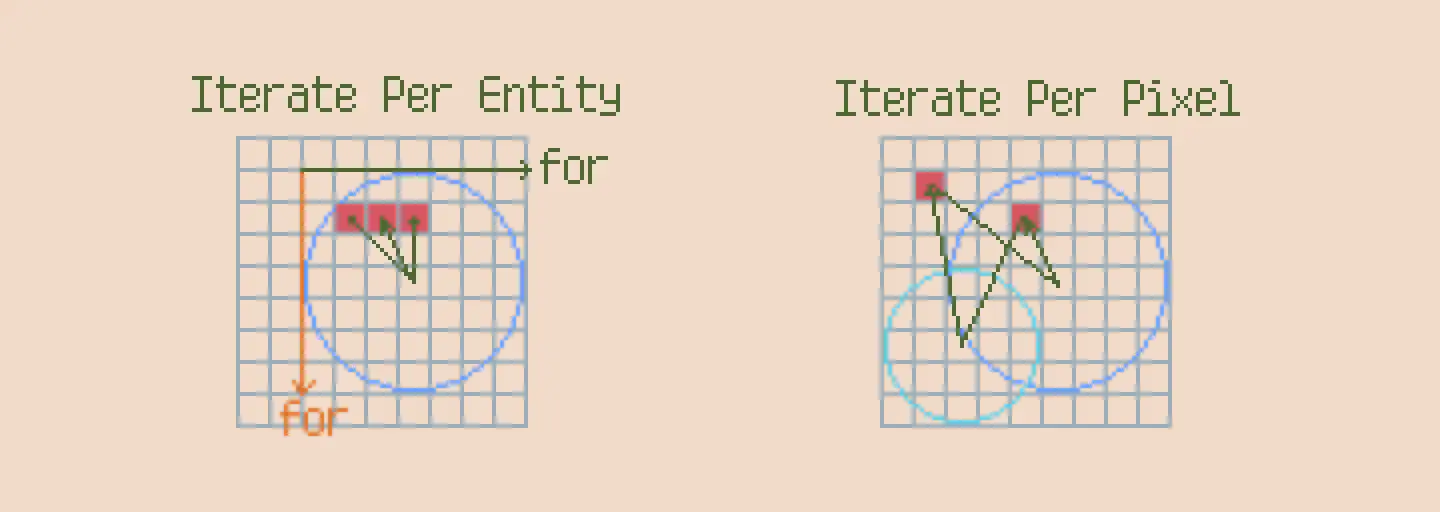
There are 2 different methods for Entity Influence Transcription, each with some performance concerns and we need to switch from one to the other depending on the entities.
Iterate Per Entity: For each compute thread we deal with one entity, calculate the position for every pixel that fall under the influence of that entity, and update them. This method is better when entities are small but numerous.
Iterate Per Pixel: For each compute thread we deal with one pixel, and we iterate through all the entities. If we find that the pixel falls in the influence of any of them, we update the pixel with corresponding calculations. This method is better when entities are large but not numerous.
The size of the entity depends on its pixel coverage. An entity having a radius 5 units on a texture with 1 px = 1 unit is equivalent to an entity having a radius 1 on a texture with 1 px = 0.2 unit.
In our setup, Iterate Per Pixel is a more natural fit as we have high pixel coverage and relatively low entity count (especially if we do cpu-side culling first). Therefore we will focus on implement the second method.
We separate the conversion and the check because later we will also need to use the pixel’s world position. We could convert once and reuse the result in other function calls.
The next question is, if we found a pixel in an entity’s influence, how do we update its color values?
For A channel, we need to reset the elapsed time to 0 as the entity’s influence will cause the grass to be in a static state.
For RG (normalized direction), we calculate the displacement from the entity’s center to the pixel, in world space.
For the B channel, we calculate via: elevation=entityY−h0+h(d) for the bottom surface elevation.
For the magnitude of RG (initial angle), we will simply apply the formula we saw in part 1 of the series to calculate the initial angle.
EntityInfluence.compute
1
#define HALF_PI 1.5707963
2
3
halfEllipticElevation(half x2, half a2, half b)
4
{
5
return b * (sqrt(max(0, 1 - x2 / a2)) + 1);
6
}
7
8
voidUpdateInfluence(inuint2 px, inhalf2 pxWorldPos, in InfluenceInfo entity)
You might notice that the velocity of the entity is not used… well, it is indeed not covered in this series but you may want to use it for a more believable simulation. For instance, the grass blade may not always bend following the radial vector, it may also follow the entity’s motion direction due to friction.
max(R2 - d2, 0.00001) is the division-by-zero guard from part 1: at d=R0 the tangent slope is infinite. max(0.01, initialAngle) keeps the stored direction from collapsing to a zero vector when the angle is tiny (normalization in the vertex shader would then blow up).
NOTE: Strictly speaking, setting time to 0 will actually cause grass blade to “teleport” to the target position. You could try to lerp the time to 0, essentially “reverse” the motion. But that would look particularly weird when the grass is underdamped.
Since we have tackled the hard part, the kernel itself becomes straightforward. One thread per pixel, skip anything outside the square, then walk entities until the first hit:
EntityInfluence.compute
1
#pragma kernel Transcribe
2
[numthreads(8,8,1)]
3
voidTranscribe(uint3 id: SV_DispatchThreadID)
4
{
5
uint2 px = id.xy;
6
if (px.x >= _InfluenceTextureParams.y || px.y >= _InfluenceTextureParams.y) return;
7
// Iterate over each entity
8
for (int i = 0; i < _InfluenceInfoCount; i++)
9
{
10
InfluenceInfo info = _InfluenceInfo[i];
11
half2 thisPxWsPos = PixelToWorldPos(px);
12
if (IsPixelInInfluence(thisPxWsPos, info))
13
{
14
UpdateInfluence(px, thisPxWsPos, info);
15
return;
16
}
17
}
18
}
[numthreads(8,8,1)] is a comfortable default for a 2D UAV: 64 threads per group, and the CPU dispatch will use ceil(textureSize / 8) groups on each axis. Pixels past the edge of a non-multiple-of-8 size are rejected by the bounds check.
The early return after a hit means overlapping entities are first-in-buffer-wins. That is good enough for this series; a later refinement could pick the closest entity, or the one with the largest initial angle, or even accumulate forces if you wish.
The compute shader so far:
EntityInfluence.compute
1
struct InfluenceInfo
2
{
3
float3 worldPosition;
4
float radius;
5
float3 worldVelocity;
6
float height;
7
};
8
9
StructuredBuffer<InfluenceInfo> _InfluenceInfo;
10
int _InfluenceInfoCount;
11
12
RWTexture2D<half4> _InfluenceTextureBack;
13
RWTexture2D<half4> _InfluenceTextureFront;
14
15
float4 _InfluenceTextureParams;
16
float4 _CenterMotion;
17
18
half2PixelToWorldPos(inuint2 px)
19
{
20
half ratio = _InfluenceTextureParams.x;
21
half2 offset = _InfluenceTextureParams.zw;
22
return offset + px * ratio;
23
}
24
25
boolIsPixelInInfluence(inhalf2 pxWorldPos, in InfluenceInfo entity)
if (px.x >= _InfluenceTextureParams.y || px.y >= _InfluenceTextureParams.y) return;
56
for (int i = 0; i < _InfluenceInfoCount; i++)
57
{
58
InfluenceInfo info = _InfluenceInfo[i];
59
half2 thisPxWsPos = PixelToWorldPos(px);
60
if (IsPixelInInfluence(thisPxWsPos, info))
61
{
62
UpdateInfluence(px, thisPxWsPos, info);
63
return;
64
}
65
}
66
}
In the next part we will set up the driver code, wire this kernel through a URP renderer feature, and verify the entity transcription actually works. The Fade kernel — the reason we allocated two textures and _CenterMotion — lands in that same part.
 FukaFuka Seika